Features / Audit trail
A loan file audit trail: who changed that number, and how to put it back.
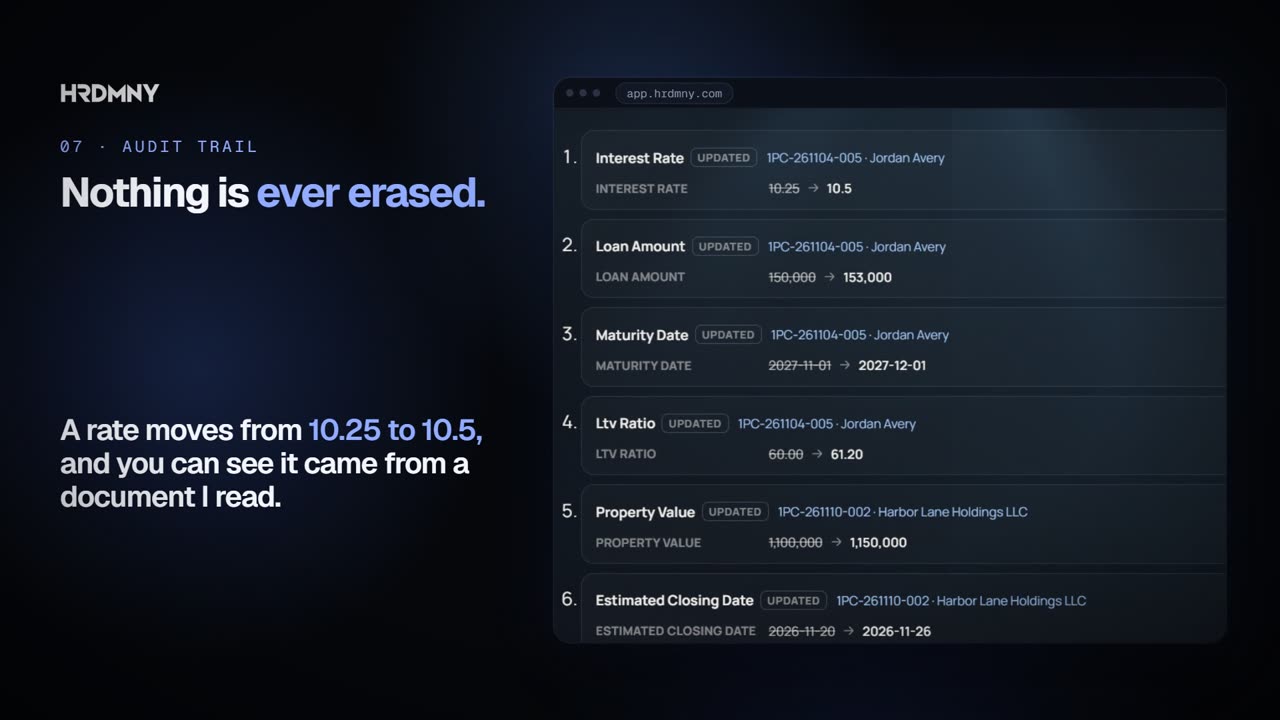
Every change to a deal is on the record: what it was, what it became, who did it and where it came from. Nothing is ever erased.
What it does
- Records every change to a deal: the old value, the new value, who made it and where it came from.
- Shows when a change came from a document Harmony read, and which one.
- Lets you put any edit back. The reversal is recorded too.
- Erases nothing.
Why it matters with an AI on the file
When several people and an AI agent work the same file, trust comes from the record. You can always answer who changed the rate, when, and on what evidence, and you can undo it.
The video, word for word
Harmony narrates her own videos. Names and figures she mentions are sample data.
Who changed that number?
Every change to a deal is on the record. What it was, what it became, who did it, and where it came from.
A rate moves from 10.25 to 10.5, and you can see it came from a document I read. Revert it, and that's recorded too. Nothing is ever erased.
See the whole loan in three and a half minutes.
The full tour follows one loan from the first email to after closing.
Straight answers
- Can an edit be undone?
- Yes. Any edit can be put back, and putting it back is recorded as its own entry.
- Does it record what the AI changed?
- Yes. A change that came from a document Harmony read is marked with that source.
- How do I get access?
- Onboarding is by invitation. Workspaces open in order from the waitlist at hrdmny.com, and nothing is charged to hold a place.