Features / Deal contacts
Deal contacts: found in the file, linked to the deal.
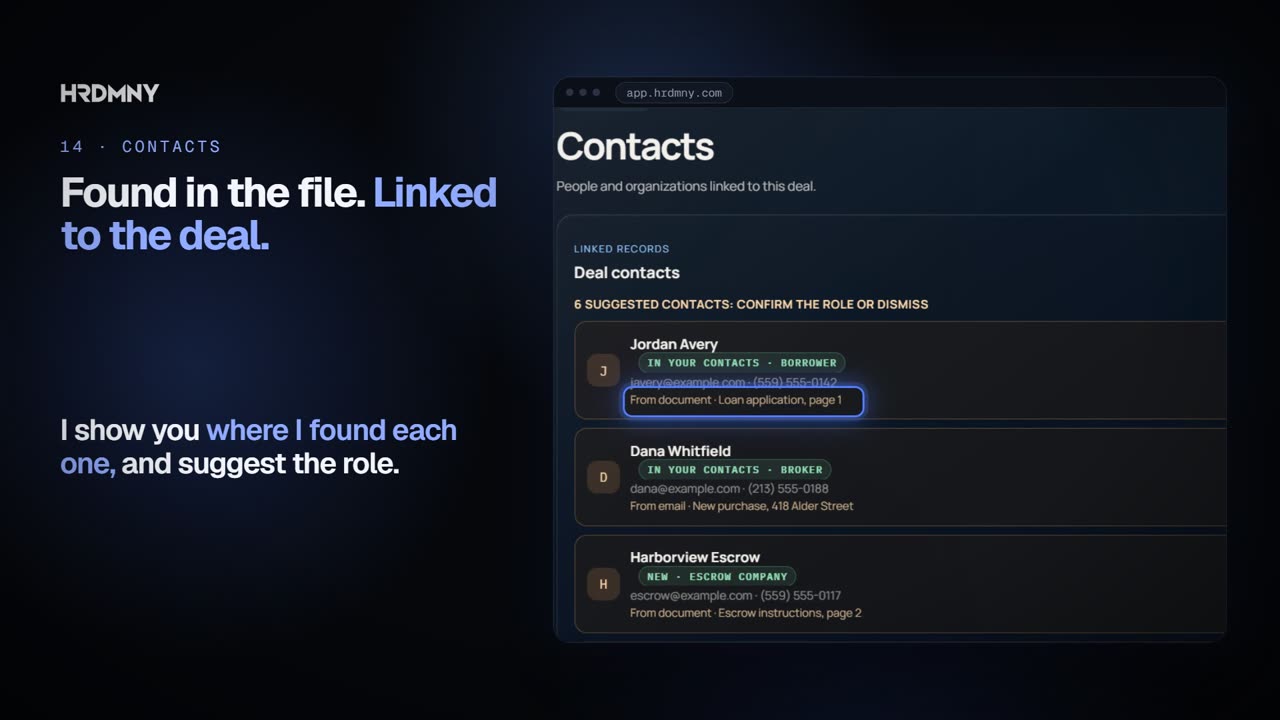
Borrower, broker, escrow, title. Harmony finds them in your emails and documents, shows where each one came from and suggests the role. You approve, and they are linked to the deal.
What it does
- Finds the people on a deal in your emails and documents.
- Shows where each contact was found and suggests the role: borrower, broker, escrow or title.
- Links them to the deal when you approve.
- Keeps track, deal after deal, of who you close with.
A contact list that keeps itself
Nobody has to stop and type a title officer's details into a form. The record builds as deals and emails come in, and reporting can then show who is on your winning deals.
The video, word for word
Harmony narrates her own videos. Names and figures she mentions are sample data.
Who's on this deal? I already know.
I find the people in your emails and documents. The borrower. The broker. Escrow. Title. I show you where I found each one, and suggest the role. You approve, and they're linked to the deal.
And deal after deal, I keep track of who you close with.
See the whole loan in three and a half minutes.
The full tour follows one loan from the first email to after closing.
Straight answers
- Can I bring my existing contacts?
- Yes. You do not have to move everything at once. Contacts are created as deals and emails come in, and you can add the rest as you go.
- Are contacts added without my approval?
- No. Harmony suggests the contact and the role, with where she found it. It is linked to the deal when you approve.
- How do I get access?
- Onboarding is by invitation. Workspaces open in order from the waitlist at hrdmny.com, and nothing is charged to hold a place.